
We have been the best IPTV subscription provider in Europe for more than 2 years now, VLC Media Player is a free tool,
and a large majority of our donors use the IPTV VLC player to access IpTv content.
There are tips to properly configure VLC to access IpTv videos and play them without any stutter or freeze. You will now be able to see the IPTV subscription channels without blocking.
VLC also offers applications for tablets.
The installation is really easy and the file size is not very large at 33MB.
In order to use your iptv abonnement m3u link on VLC, it’s very simple: open VLC then click on Media => Open Network Stream, paste the m3u URL in the box and click on the Play button.
Photo explanation:
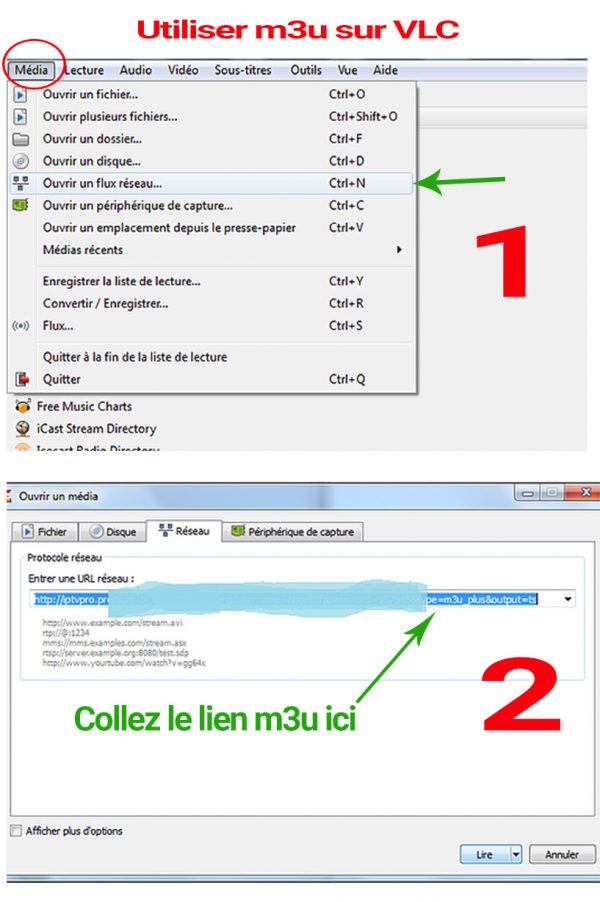
If the file is on the computer, right click on it then Open with> VLC.
VLC cannot have channel epg and logos, it only allows you to play channels and vods in a simple Playlist
Avoid IPTV Play Blocks in VLC
The VLC multimedia player allows you to play IPTV subscription directly accessible in streaming.
Slowdowns in VLC are usually caused by:
- hardware limitations: your laptop or smartphone is not powerful enough
- too low a bandwidth
- the saturated and clogged read buffer: we are going to see how to configure VLC to prevent the VLC read cache from becoming full.
There are two methods to change the streaming buffer in VLC Player: - a permanent method which impacts the overall configuration of VLC
- a temporary method that only affects the current flow