
this method is valid for Freebox revolution and mini 4K,The first method is to deactivate it via your free subscriber space and can be used for a box V5 or a v6. The second method allows you to pass your box in IPv6 via the Freebox OS interface,
Method 1: via the Subscriber space free:
Go to your free subscriber area and fill in your username and password:  Then, go to the “my Freebox” section in the menu on the left side of the screen. Here, you will be offered several options that we are interested in is “switch to IPv6 protocol”.
  After selecting this option, you simply choose “no” for the “IPV6 support” option to disable it:
Method 2: via the Freebox OS interface :
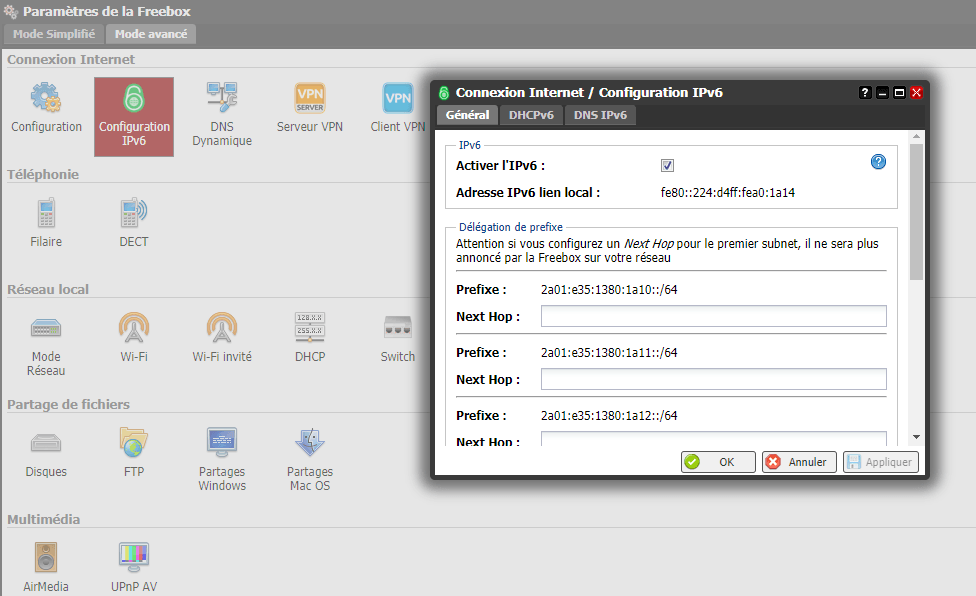
Connect to your Freebox OS interface, make sure that the “Advanced mode” is enabled and then select “Free box settings”.  Then, in the “Internet connection” section, click on “IPv6 configuration”. A window will open, you will finally have to uncheck the checkbox “enable IPv6” to disable the option.